I am by no means an Apple Guru, but I do tend to dabble this things a bit more than my friends. And I'm usually the person they go to when their computers aren't working. Until today, the most daring and complicated thing I've accomplished was figuring out how to get my Macbook Pro to mount a drive for Time Machine that's connected to a Mac Mini on my network. Making that work was a huge accomplishment for me.
But today, I just made my life as an art director a heck of a lot easier, by figuring out how to sync my user fonts between my work iMac, my home iMac, and my Macbook Pro laptop. And it's all thanks to Dropbox and symbolic links.
Basically, a symbolic link creates a clone of a particular folder and keeps that folder in sync with it's original folder no matter where you put it (as long as the link to the original folder can be found. You can't disconnect the drive the original folder is on and expect it to work).
So, I deduced that if I created one main "Font" folder in my dropbox, and then used symbolic links to sync that folder with my user font folder on each computer, then my fonts would always be in sync on all three computers. Hallelujah! For someone who is constantly switching from computer to computer when working from home, work and on the road. So, I wanted to share the love and wisdom for anyone looking for a simple way to keep their font library consistent.
Now, I use FontBook for my font organization. Many designers might scoff at this, but it's simple and works for me just fine. I've tried FontExplorer and FontCase before, but neither did anything extraordinary enough for me to keep using them.
Make sure you back up your computer before messing with this stuff. Just in case.
Here's how to set things up:
First, your user fonts, when using FontBook, are kept in your user Library folder. ~/Library/Fonts
To view this folder, you'll need to hold down option while clicking GO in Finder, so that Library shows up.
Once open, you'll see a folder inside called "Fonts". This is your collection of User-installed fonts.
Copy this folder to your Dropbox folder.
Next, you'll need to make a symbolic link to this folder. You could do it through terminal, or you can install this handy little action script that will allow you to right click and do it through services.
This video was very helpful with explaining how to do that:
Now that you've created a link to your Fonts folder, you can replace the Fonts folder in your Library folder. Easy-peasy.
However, on two of my computers, I was running into the issue where when I tried to delete or replace the Fonts folder in my Library, I would get the error: "can't be modified or deleted because it is required by OS X."
I thought I had hit a dead end. Even though I was an admin of the computer, changing the read/write capabilities of the users and folder didn't do anything.
Then I found this handy article about moving and renaming files through Terminal.
So, if you run into this same issue, all you need to do is rename your Fonts folder to something else, like so:
Open Terminal and write "sudo mv ~/Library/Fonts ~/Library/Fonts_old". This will rename your Fonts folder in your Library, allowing you to drag in the new symbolic link Fonts folder. Then you can delete your old Fonts folder, although you may be asked for your admin password to delete it.
And that's it! Do this on each computer that you want to sync your fonts on, and just make sure that you are using the same Dropbox account on each one. Then, anytime you want to install a new font, just put it in your Dropbox/Fonts folder and it will show up on all your computers that are symbolically linked.
</geekiness>

Showing posts with label agency life. Show all posts
Showing posts with label agency life. Show all posts
Wednesday, March 11, 2015

Sunday, February 9, 2014
Thursday, December 19, 2013
The Whimsically Wonderful Holidelightful Festively Fantastic Cardtraption
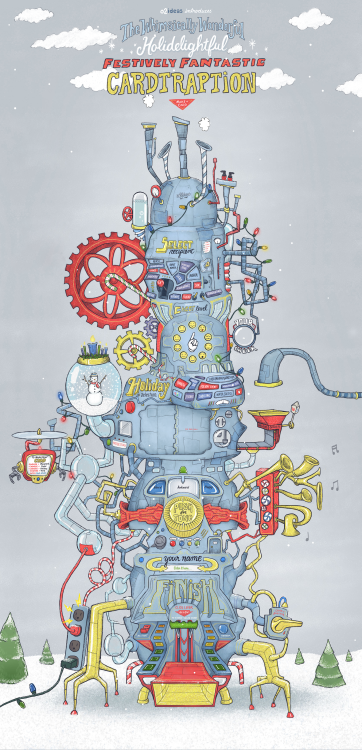
I am really excited to share with you all the first major project that I have been working on since I started my new job at o2 two months ago. It’s our company holiday card, the Whimsically Wonderful Holidelightful Festively Fantastic Cardtraption!
Another art director here did all of the illustrations, while I was in charge of all the artwork for the nearly infinite number of card combinations that can be created. It was a lot of work and I’m really proud of everyone who worked so hard on it, and I think it turned out amazing.
Check it out!
Thursday, June 13, 2013
Where Parents Are Born
One of three ads I've been working tirelessly on for the past two months. I'm really happy with how this one turned out.
Friday, November 9, 2012

Cedrick and I did this poster recently for the University of Alabama on-campus bookstore. I think it turned out pretty sweet.
Wednesday, October 31, 2012

Friday, October 12, 2012
Tuesday, October 2, 2012
How Awcard

This week is very exciting for me! Besides working on a lot of cool stuff at work, Cedrick and I finally got around to launching our new business, How Awcard. It’s a card company we created based around quirky, awkward lines paired with clean, minimal design and sometimes little doodles.
I’m really happy with the variety of cards we started out with, everything from Birthday and I love you cards to Mother’s/Father’s Day and apology cards. All the lines are hilarious to me. I love working with Cedrick on stuff like this.
We officially launched on Sunday night and within 10 min had our first sale! It was super exciting. This week is dedicated to us getting the word out, gaining fans and followers, and gauging reactions to the products.
It’s an exciting little adventure and I can’t wait to see where it takes us! Check it all out below and let me know what ya’ll think!
Website | Facebook | Twitter | Tumblr
Saturday, August 18, 2012

Friday, August 3, 2012

Quit procrastinating

Cedrick and I seem to have opposing views when it comes to motivational materials hanging in our cube…
Friday, June 15, 2012

Tuesday, April 17, 2012
I love fonts!


I’ve been on a font-buying spree recently. It’s going to kill my finances. But I just can’t help myself. I just bought the font above, Love Potion No. 10, and this weekend I bought a wonderful woodtype font, Veneer. At least they were both on sale. Hopefully I can use them in some projects for work and get reimbursed for them.
Wednesday, March 28, 2012

Figured out we can draw on our cubicle glass with dry erase markers. I made Cedrick a present. (Taken with instagram)
Tuesday, March 20, 2012
Red Mountain Theatre Company


Uploaded a new campaign to my site. Posters for Red Mountain Theatre Company’s 2011-2012 season.
Quotes illustrated by the amazing Chris Piascik.
Thursday, February 16, 2012

Tuesday, January 31, 2012

Saturday, October 9, 2010

Subscribe to:
Posts (Atom)